

STICKER PEEL EFFECT
- milesstewart
- Feb 22, 2021
- 2 min read
Updated: Mar 10, 2021
The sticker peel effect is a very easy and simple effect that can be applied in many situations, to make an image look as if it is either a sticker, or a page turning.
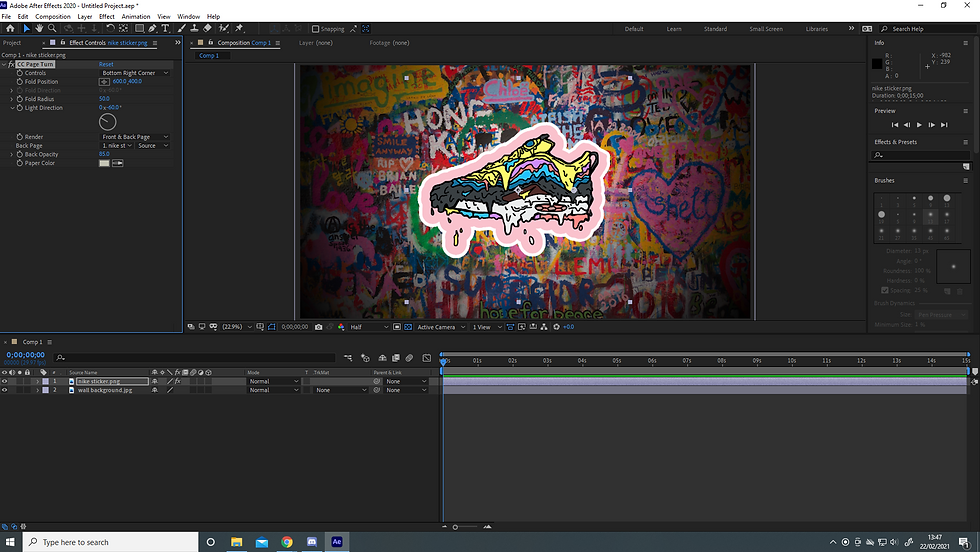
To begin with, set up the scene you want the sticker peel effect to be within. For my case, I am using a graffiti wall, and a shoe sticker. Select the layer you want the sticker or page turn effect to be on, and goes to effect < distort < CC page turn. You should now have applied the page turn effect to the layer.

Within the CC page turn options, you can choose where the fold occurs, how fast the page turn happens, the fold radius and much more. For now, we will animate the page turn, by turning on the fold position time stamp, at the time you want the animation to finish. In this case, at 1 second I am turning on the fold position time stamp, so at 1 second it will have finished the animation. Now go back to the start of the timeline, or where you want the effect to start, and alter the first value of the fold position, until it is off of the screen. You now have the basic animation of the sticker coming onto the screen, and peeling itself onto the screen.

You can also change to opacity of the sticker, as well as changing the look of the back of the sticker, by applying different colours, textures and different images to the back of the image. This can be useful for situations such as page turn, where you don't want the image to be transparent, and you might want a different image on the back. Here is what the basic CC page turn sticker peel effect looks, without tinkering around with any of the other effects.
This is a very easy and simple effect that can make projects look great, and I will definitely be using this in the future, in some way or another.


Comments